Answer first: Yes — page speed is now an AEO factor, not just an SEO one. AI crawlers and rendering systems work under tighter time and resource budgets than a human browser. A page that loads slowly, shifts around while rendering, or takes too long to respond to interaction risks being skipped, truncated, or deprioritised before an AI engine ever gets to read your content — regardless of how good that content is.
What Core Web Vitals actually measure
Google's Core Web Vitals are three specific, measurable signals:
- LCP (Largest Contentful Paint) — how long it takes for the main content of a page to become visible. Slow LCP means a crawler (or a visitor) waits longer before seeing anything worth reading.
- INP (Interaction to Next Paint) — how quickly a page responds after someone interacts with it. This matters less for AI crawlers directly, but it reflects the same underlying code bloat that slows everything else down.
- CLS (Cumulative Layout Shift) — how much content jumps around as a page finishes loading. Heavy layout shift often signals unoptimised media (like oversized hero videos) still loading in the background.
These aren't abstract scores. They're a direct read on how much technical weight your site is carrying — and that weight has consequences beyond the Google rankings they were originally built to measure.
Why this matters specifically for AI engines
Traditional SEO treats Core Web Vitals as a ranking factor among many. AEO treats them as a gatekeeping factor. Here's the distinction:
- Google's crawler will eventually index a slow page — it just ranks lower.
- An AI engine generating a real-time answer often has a much shorter window to fetch, render, and extract meaning from a page before it times out and moves to the next source, or skips citing altogether.
A bloated page — oversized unoptimised video, a dozen loaded font families, unnecessary JavaScript — doesn't just cost you Core Web Vitals points. It can mean an AI engine never actually gets a clean read of your content in the first place, no matter how well-written that content is.
A real example: what fixing this actually looks like
We recently audited a Hong Kong service-based website carrying classic Core Web Vitals problems: an oversized, unoptimised hero video with no poster image, and ten separate font families loaded site-wide when only three were actually used. The fixes were unglamorous but decisive:
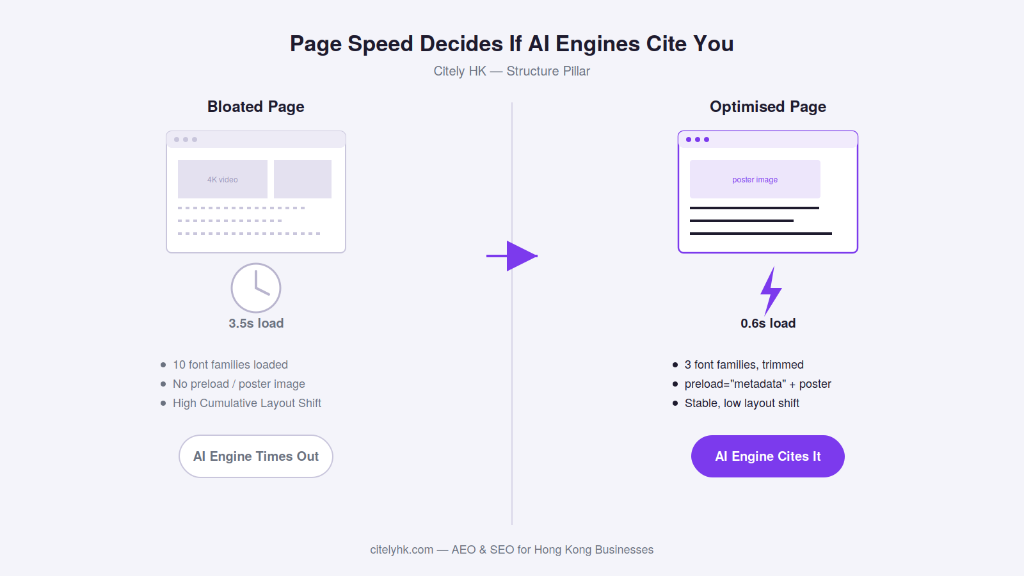
- Added preload="metadata" and a poster image to the hero video, so the page didn't have to fully download video data before becoming interactive.
- Cut the font-loading list from ten families down to the three genuinely used.
- Fixed a bloated title tag that was adding unnecessary weight to page load.
Result: homepage load time dropped from 3.5 seconds to roughly 0.6 seconds, and Time to First Byte (TTFB) dropped from 1.73 seconds to about 0.3 seconds. Google Ads Quality Score diagnostics, which had flagged Landing Page Experience as below average across every keyword, immediately had a real fix to respond to — not a content or bidding problem, a loading-weight problem.
The checklist: what to look for on your own site
- Check real pixel dimensions of hero videos and images — a "compressed" filename doesn't mean the actual resolution was reduced. A 4K video decoding on a mobile device is still expensive regardless of its file size.
- Add preload="metadata" and a poster image to any autoplaying background video.
- Audit your loaded font families — most sites load far more than they use. Trim to only what's genuinely rendered.
- Keep title tags and meta descriptions lean — bloated head tags add avoidable weight before the page even starts rendering visible content.
- Test with a raw fetch, not just DevTools — cached or JS-rendered views can hide the true server response time a crawler actually experiences.
How this connects to your Structure pillar
Page speed sits squarely in the Structure pillar alongside schema markup and technical SEO fundamentals — it's part of the foundation that makes your site legible and fast enough for both search engines and AI systems to actually process. A perfectly schema-marked page that takes six seconds to load is still handing AI engines a reason to skip it.
The bottom line
Core Web Vitals used to be a Google ranking checkbox. Now they're closer to a pass/fail gate for whether AI engines bother reading your content at all. Fixing them isn't glamorous work — it's poster images, font audits, and trimming bloated tags — but it's some of the highest-leverage technical SEO and AEO work a Hong Kong business can do this quarter.
Frequently Asked Questions
Both, but for different reasons. Google uses Core Web Vitals as a ranking signal among many. AI engines operate under tighter fetch-and-render time limits, so a slow or bloated page risks being skipped or only partially read before the engine moves on — which affects whether your content gets cited at all, not just how it ranks.